OpenAI’s “compromise” with the Pentagon is what Anthropic feared - MIT Technology Review
This story deserves to be shared
Send it to someone who'd care, or post it on your networks.
This article is an excerpt. To read the full content, visit the original source. MIT Technology Review
Related articles
ConnectWise Credential Compromise Enables Unauthorized Access to 173 Microsoft 365 Tenants: Cybersecurity Incident Analysis - Rescana
Executive SummaryOn October 13, 2026, unauthorized access was detected across 173 Microsoft 365 tenants via a compromised ConnectWise service account credential. The attackers exploited delegated admin privileges, enabling broad access to sensitive data including mailboxes, OneDrive, SharePoint, Teams, and directory information. The incident did not involve a software vulnerability in ConnectWise but rather the theft or exposure of a legitimate credential. Affected organizations span managed service providers (MSPs), law firms, national security and trade entities, and critical infrastructure sectors. The attack leveraged only legitimate credentials and native Microsoft 365 administration tools, making detection challenging. Immediate remediation steps included disabling the compromised credential and revoking admin privileges. No malware was identified, and no specific threat actor attribution has been made. All findings are based on evidence from The Hacker News (Oct 17, 2026), Huntress (Oct 16-17, 2026), and the official ConnectWise Trust Center advisory (Oct 16-18, 2026).

Fact Check: Video Of AI Recruiter Job Interview With AI Agent Representing Applicant Is NOT Real -- It's A Staged Parody - Yahoo
Is a video of an AI agent representing a job candidate during an interview by an AI recruiter real? No, that's not true: The video showing the chaos of two AI agents talking to each other during the interview was staged as a parody, according to the content creator. "They're staged, but not scripted," he said. The claim originated in a video (archived here) posted on the Graham Dot Zip YouTube channel on October 12, 2026, under the title "I Sent an AI to My Job Interview. So Did the Company. " The caption read:The company sent an AI recruiter to interview me, so I sent an AI to represent me. Then I sat in the meeting and watched the two of them discuss my career. This is what the first frame of the video looked like on YouTube at the time of writing:Source: Graham Dot Zip YouTube ChannelClick below to watch the video on YouTube:The video starts with the creator, Graham Dot Zip, introducing his AI assistant, Victor, to the AI agent conducting the interview. "Victor is my representative," he said. "He's just here because he knows my resume better than I do. "Victor then overstates Graham's work experience, despite Graham's attempt at correcting him.

Edit, sign, and convert PDFs with this $79.99 lifetime Mac app - Mashable
TL;DR: Get lifetime access to PDF Expert for Mac for $79.99 (reg. $139.99), with tools for editing text, rearranging pages, signing forms, and working with scanned PDFs. Your Mac can handle some pretty impressive things, so it’s a little annoying when editing a PDF becomes the task that slows you down. Fixing one typo shouldn’t require a new workflow, and signing a form shouldn’t turn into a whole afternoon of troubleshooting. PDF Expert brings tools for editing text, inserting images, signing forms, and converting documents into one app. For a limited time, new users can get a lifetime subscription for $79.99 (reg. $139.99). The app lets you edit existing PDF text, replace images, add links, and make changes without rebuilding a document from scratch. You can also highlight important sections, leave comments, and add notes when reviewing reports, contracts, or class materials. If your PDFs are scattered across multiple files, PDF Expert can merge them into one document or split a larger file into smaller ones. You can rearrange, rotate, and delete pages, too, which is useful when someone sends you a 40-page document and you only need three pages.
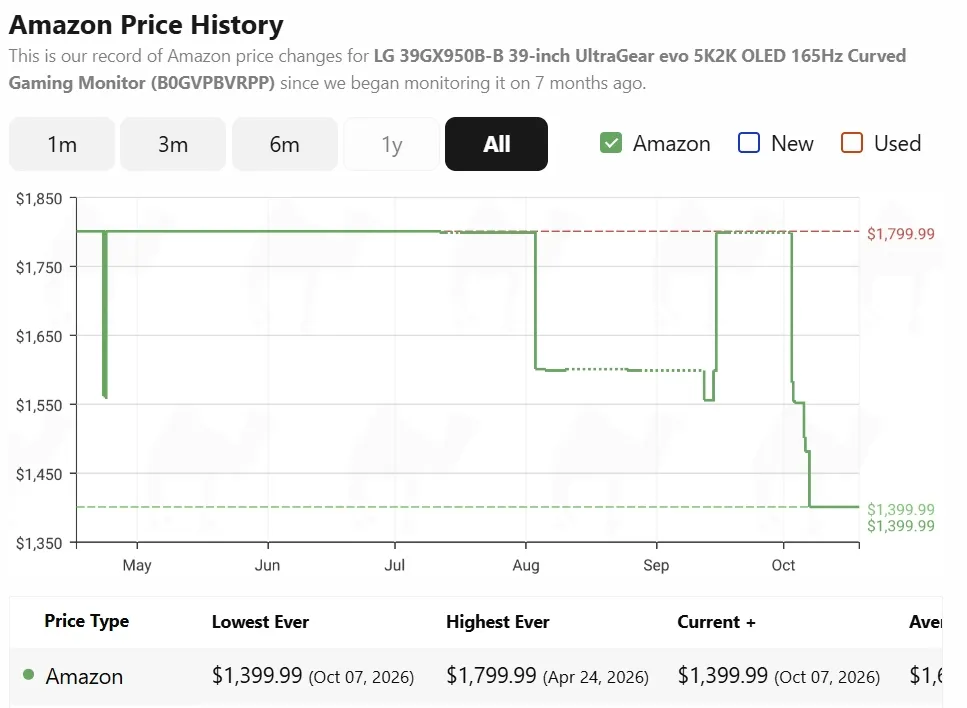
Amazon deal has knocked $400 off this popular LG Ultrgear OLED gaming monitor - PC Guide
PC Guide is reader-supported. When you buy through links on our site, we may earn an affiliate commission. Read More What we like about this LG Ultragear 39GX950B-B gaming monitor
0 comments
No comments yet. Be the first to share your thoughts!