China Bets on Technology to Resist U.S. Pressure - The New York Times
This story deserves to be shared
Send it to someone who'd care, or post it on your networks.
This article is an excerpt. To read the full content, visit the original source. The New York Times
Related articles

Technicians Do Not Resist Technology; They Resist Technology That Does Not Help Them - ACHR News
A survey of 181 commercial HVAC service technicians was conducted to test the widely held assumption that field technicians resist digital technology, and to identify what separates the technology they value from the technology they do not. The study found that willingness is not the constraint. It is high and does not vary with tenure: 78% say digital tools make their work easier, 96% want more training, and technicians with more than 10 years in the trade are no less receptive than those with fewer than three. Yet the typical technician reports that technology has helped as much as it has hurt—a net return of zero—and only one in seven works with both the information and the connectivity that deployed software assumes. Technicians consider technology useful when it helps them arrive at the job with key information, and when the technology shortens diagnosis. Technology that makes coordination easier (e.g., paperwork and dispatch, which represents the majority of current field technology) showed inconclusive results on its helpfulness or harm. FTL concludes that technicians benefit most from technology that helps them solve problems in the field.

Fact Check: Video Of AI Recruiter Job Interview With AI Agent Representing Applicant Is NOT Real -- It's A Staged Parody - Yahoo
Is a video of an AI agent representing a job candidate during an interview by an AI recruiter real? No, that's not true: The video showing the chaos of two AI agents talking to each other during the interview was staged as a parody, according to the content creator. "They're staged, but not scripted," he said. The claim originated in a video (archived here) posted on the Graham Dot Zip YouTube channel on October 12, 2026, under the title "I Sent an AI to My Job Interview. So Did the Company. " The caption read:The company sent an AI recruiter to interview me, so I sent an AI to represent me. Then I sat in the meeting and watched the two of them discuss my career. This is what the first frame of the video looked like on YouTube at the time of writing:Source: Graham Dot Zip YouTube ChannelClick below to watch the video on YouTube:The video starts with the creator, Graham Dot Zip, introducing his AI assistant, Victor, to the AI agent conducting the interview. "Victor is my representative," he said. "He's just here because he knows my resume better than I do. "Victor then overstates Graham's work experience, despite Graham's attempt at correcting him.

Edit, sign, and convert PDFs with this $79.99 lifetime Mac app - Mashable
TL;DR: Get lifetime access to PDF Expert for Mac for $79.99 (reg. $139.99), with tools for editing text, rearranging pages, signing forms, and working with scanned PDFs. Your Mac can handle some pretty impressive things, so it’s a little annoying when editing a PDF becomes the task that slows you down. Fixing one typo shouldn’t require a new workflow, and signing a form shouldn’t turn into a whole afternoon of troubleshooting. PDF Expert brings tools for editing text, inserting images, signing forms, and converting documents into one app. For a limited time, new users can get a lifetime subscription for $79.99 (reg. $139.99). The app lets you edit existing PDF text, replace images, add links, and make changes without rebuilding a document from scratch. You can also highlight important sections, leave comments, and add notes when reviewing reports, contracts, or class materials. If your PDFs are scattered across multiple files, PDF Expert can merge them into one document or split a larger file into smaller ones. You can rearrange, rotate, and delete pages, too, which is useful when someone sends you a 40-page document and you only need three pages.
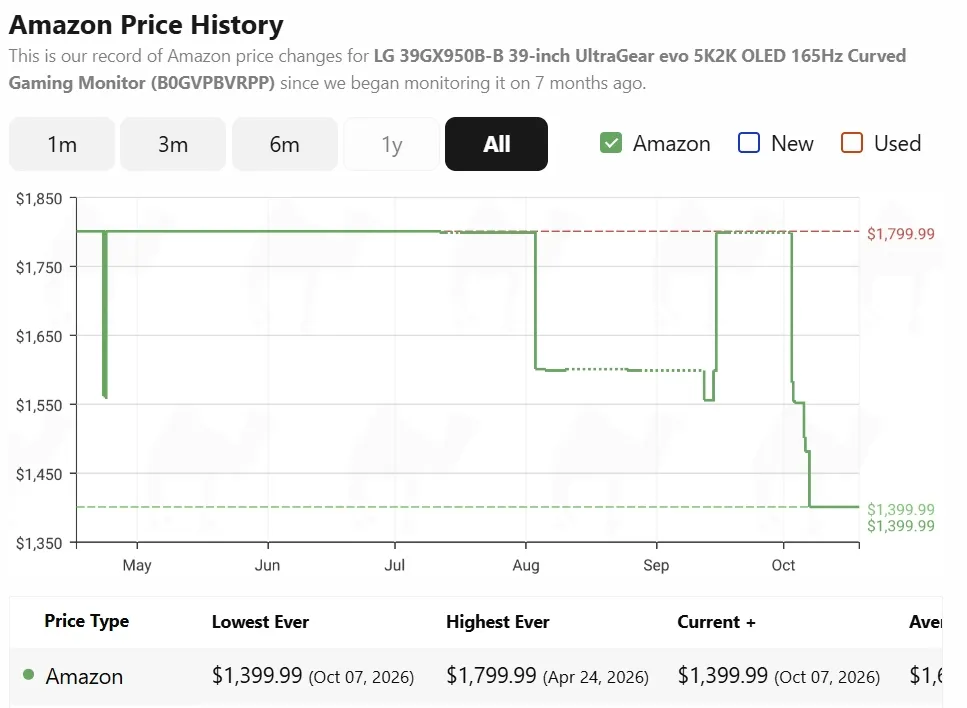
Amazon deal has knocked $400 off this popular LG Ultrgear OLED gaming monitor - PC Guide
PC Guide is reader-supported. When you buy through links on our site, we may earn an affiliate commission. Read More What we like about this LG Ultragear 39GX950B-B gaming monitor

Amazon Fire HD 10 tablet is down to its lowest price ever, as Amazon deal shaves 53% off - PC Guide
This budget tablet is now even more affordable PC Guide is reader-supported. When you buy through links on our site, we may earn an affiliate commission. Read More
0 comments
No comments yet. Be the first to share your thoughts!